Saturday, June 11, 2016

How to Install android on your iPhone

  No comments
7:01:00 PM


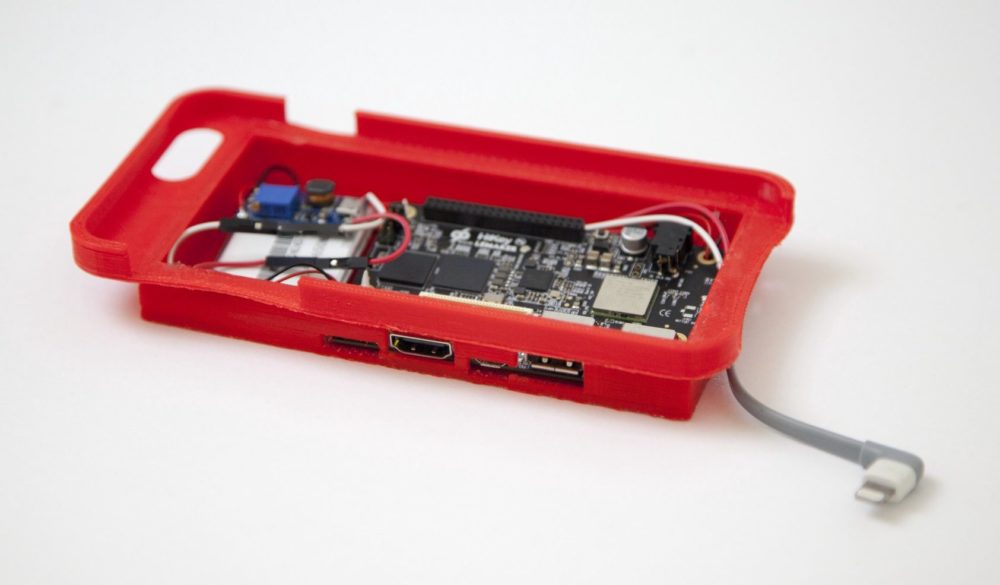
The American developer "Nick Lee" shared a way to run android on iPhone .
And he used a Nexus 5 , lightning cable and mAh battery.

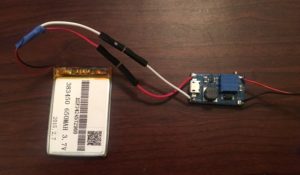
Taking advantage of the open source nature of the Android OS, Lee used the tools from Google’s Android Open Source Project to build an app that would allow his iPhone to run using Android’s latest version, 6.0.1 Marshmallow. He started with an embedded Android HiKey development board and linked it up with a lithium-polymer battery pack with an an integrated protection circuit to prevent things like explosions and giant fireballs. Lee also needed to use a boost converter voltage regulator that would allow the battery pack’s 3.7 volts to run the HiKey. Unfortunately, there were still some hardware issues that he would need to sort out before he could get everything working.
“While the initial power-on was successful, complete system failure occurred upon connecting a lightning cable between my iPhone and the HiKey. After some multimeter-fueled investigation, I concluded that the iPhone was simply drawing too much current, and the battery couldn’t supply enough to run the HiKey and charge the phone. No biggie — I added a resistor between the USB ports +5V pin and the lightning cable, limiting the current to a reasonable amount. I couldn’t simply clip the 5 volt line as iOS seems to disable USB data transfer unless power is also connected. Life lesson: V=IR is your friend,” Lee writes on the Tendigi blog.
                                         
                                      
Once Lee had all of the hardware issues worked out he turned his attention to designing an enclosure for all of the new hardware that he needed for this hack to work. He was initially going to use the casing from an existing external battery pack, but that ended up not being a workable solution. He decided to give 3D printing a try, and quickly adapted an iPhone 6 Plus case that he found on Thingiverse, using Sketchup to fit all of the new components. Because Lee didn’t have a 3D printer, and has never used one before, he ended up buying himself a da Vinci 2.0 Duo 3D printer from XYZprinting. At under $500 Lee figured that buying a 3D printer was preferable to paying a local 3D printing service provider $50 a pop for each iteration of his case design.


Read More

Friday, June 10, 2016

How to use Google as a Pro

  No comments
7:13:00 PM


Google has a lot of results , but sometimes you can get the answer you want , So I made this to tell you how to search in Google as a Pro .


1- Exclusion
You can search about for example Adobe Photoshop and you find lots of tutorials , but you don't want them , So type in Google  Adobe Photoshop cc -tutorial .

Before


After

2- Search in Certain Time

Sometimes when you search for an app it gives you old version and when you search about News it gives you old News , So this will help you .

Before
After
3- Searching for Appropriate image

In Google Image you can choose the Size of the , the Type , Time of the , Color and the Usage Rights of the image.


4- Searching for Video

Many of us when they search for a video they type "Video of NASA" , but it's better to choose the Video label in Google .

Before
After
and also you can Set the Duration of the Video , the Quality , the Source and more

 
5 - Video Usage Rights in YouTube

Most Videos in YouTube have a license that you can't re-upload the Video or use it in any Commercial use , but if you choose Creative Commons YouTube will give you Videos that you can re-upload then and use them for Commercial use .


Read More

Thursday, June 9, 2016

Know your Future now from google

  No comments
7:08:00 PM


We all know that it's impossible to know our Future , but Google made a site that can tell you something of course not your future , but have you asked yourself about refugees
 Google made that site to remind you with the refugees and when you ask about anything in your future it tells you
OF COURSE WE CAN'T PREDICT YOUR FUTURE!
But 60 million refugees ask themselves every day if they have a future at all. So we used a fake Google-site to get your attention because apparently you were interested in your own future. Please take a moment to think of their future.
 and it gives you links to donate to the refugees

Read More

Monday, June 6, 2016

Hackers can see your Whatsapp and Telegram messages see How

  No comments
4:49:00 AM


We all know that Whatsapp and Telegram are very secured , because they use Peer-to-peer encryption , but there is new security issue that make hacker hack your Whatsapp or Telegram and it's Signaling System 7 (SS7)


Read More

Saturday, June 4, 2016

Best VPNs of 2016...and what is a VPN ?!

  No comments
1:05:00 PM

What is VPN ?
- VPN is a Virtual Private Network and is a method used to add security and privacy to private and public networks, like WiFi Hotspots and the Internet. VPNs are most often used by corporations to protect sensitive data.

What is the of usage VPN ?
- You can use it to change your IP address so you can watch the censored content in your region and you can get anonymous from your government or your ISP

Protection

Protection is the very essence of the VPN. When you are connected using a VPN, your computer or device becomes invisible to the rest of the internet. Bots, viruses, trojans and hackers which inhabit the internet simply cannot attack you, because you do not “exist” for them. If you are not using a VPN, you are especially vulnerable when you connect to the Internet via an open Wi-Fi network in the airport, coffee shop or any other public place. Because an open Wi-Fi network is unencrypted and unsecured, attackers may gain access to everything stored on your computer (e.g., important passwords) without any serious effort. They can even intercept your session with your online banking site and transfer your money to their accounts while you have your coffee. However, none of this is possible if you are connected to a VPN – for your attackers, both you and your connection do not exist.

Anonymity

Whenever you are connected to the Internet, you are assigned an IP address–a numerical combination that is essentially similar to a regular street address. With an IP address, you can be tracked down as easily as with a regular street address. You will be amazed how much one can learn about you; just visit this page: http://addgadgets.com/IPaddress/.
Many people do not like that level of access, so they use a VPN, which replaces their real IP addresses with the IP address of the gateway, which can be located in a different country.
Some websites, such as Hulu Plus, Netflix, Amazon Prime, Vudu, CBS, Spotify, Pandora, and many others, first check your IP address. If you’re not in the U.S., for example, they prevent you from accessing their services. Therefore, many people use various VPNs based in the United States so that the above-mentioned services do not see your real IP address but instead see the one in the U.S. (that belongs to the VPN) and unblock your access. In fact, this is a serious headache for many Internet users, especially for U.S. citizens abroad. Imagine what a respectable American citizen traveling abroad must feel when he or she finds out that his or her access to movies and TV series (on Netflix, Hulu, or Amazon) has been blocked, even if it has been paid for in advance.

But you should see the privacy of the VPN because some of the VPNs may sell your personal information 


Top 5 VPNs :


1- F secure freedom : (Paid)


It is avalabe for Windows , Mac , Android and IOS

2- Cyberghost : (Free - Paid)


It is available for PC , mac ,Windows ,linux , IOS but on the IOS it needs an account in the website

3- SoftEther VPN : (Free)


It is available for PC only


4-Onavo VPN : (Free)


It is a very good VPN for IOS users in my opinion it is the best VPN for the IOS users

5- Betternet (Free)

It is available for Windows , Mac , Android , Iphone and even as an extension in Chrome and Firefox it gives you unlimited data .

And don't forget to like our page on Facebook  Press here to like ;)

Read More

The best Antivirus for 2016 !!....and how to protect your system from hackers ?!

  No comments
7:09:00 AM


There are many Antiviruses that you all can use , but have you asked yourself what is the best antivirus ?

What do you want from the Antivirus ?
- of course I want protection, but how you choose the Antivirus that update its database as fast as possible and the lowest CPU and Ram consumption .


So, the best Antiviruses are  Bitdefender , Kaspersky and Norton.

 Sources 
Source 1
Source 2

Read More

Wednesday, June 1, 2016

Information about PlayStation®VR

  No comments
1:41:00 PM

Sony has finally announced that the PlayStation VR will cost $399, and it will be available in October 2016. The company shared the news this afternoon during a short keynote at the 2016 Game Developer Conference in San Francisco, CA.

As ''CHRIS NORDER'' SAID:''PlayStation VR's processing unit doesn't add any power to the PS4''

The system specifications are:
Norden added, "Actually, it's not really accessible to the developer in any way," noting that "the PlayStation 4 is perfectly capable of [running games at] 120 Hz."


it comes with HDMI CABLE and USB CABLE also the AC POWER CORD to activate the system and the cpu

Sources
Source
Source

Read More

Use ''Do Not Disturb'' on your iPhone, iPad, or iPod touch

  No comments
10:28:00 AM


From the features of the iPhone is " Do Not Disturb"

which make you stop receiving calls at a time you choose , a useful feature in rejecting calls while sleeping or working time in order to even the annoying phone is not for you.


If you don't want to be disturbed at a certain time, you can set a schedule. Tap Settings > Do Not Disturb and turn on Scheduled. Then set a time.

Read More